Buy the first property plan instead of starting with a portfolio-wide migration.
Fewer guest questions. More revenue per stay.
Stay Screen helps short-term rental property managers replace scattered instructions, stale welcome books, and buried messages with a guest welcome screen on the TV already inside every unit.
- For teams managing multiple short-term rentals, condo units, or boutique hospitality rooms.
- Solves repeat Wi-Fi, parking, access, house-rule, local recommendation, and checkout questions.
- Replaces buried messages and stale welcome books with one remote-friendly guest TV experience.
One property, $29/month. Checkout takes minutes and setup instructions arrive right after purchase.
Move messages, PDFs, binders, and QR links into a TV-first guide.
Expand only when support, reviews, checkout, or add-on visibility improves.
Manager dashboard
4 TVs paired
Beach Tower Resort
Unit 804
Guest-ready
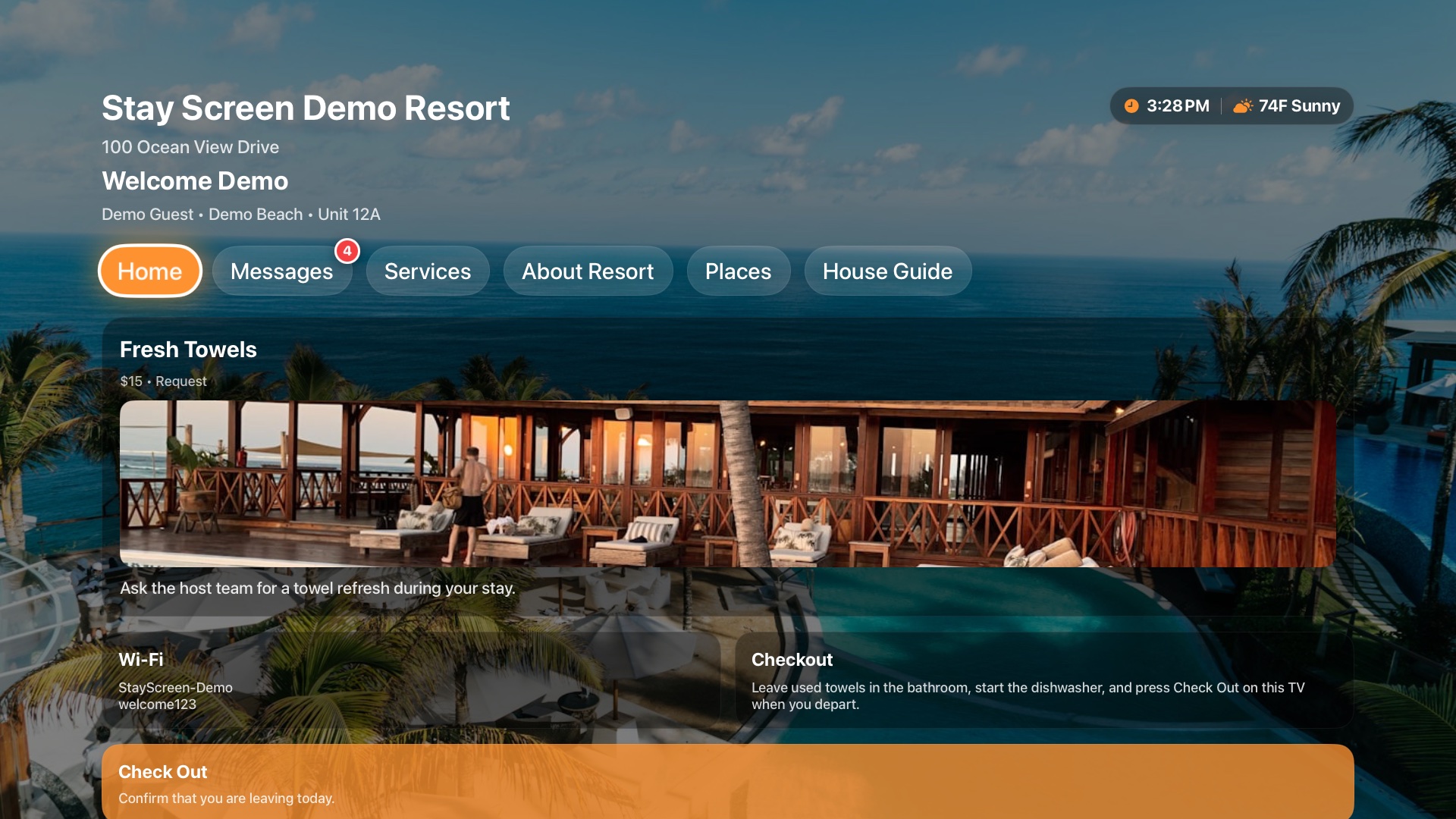
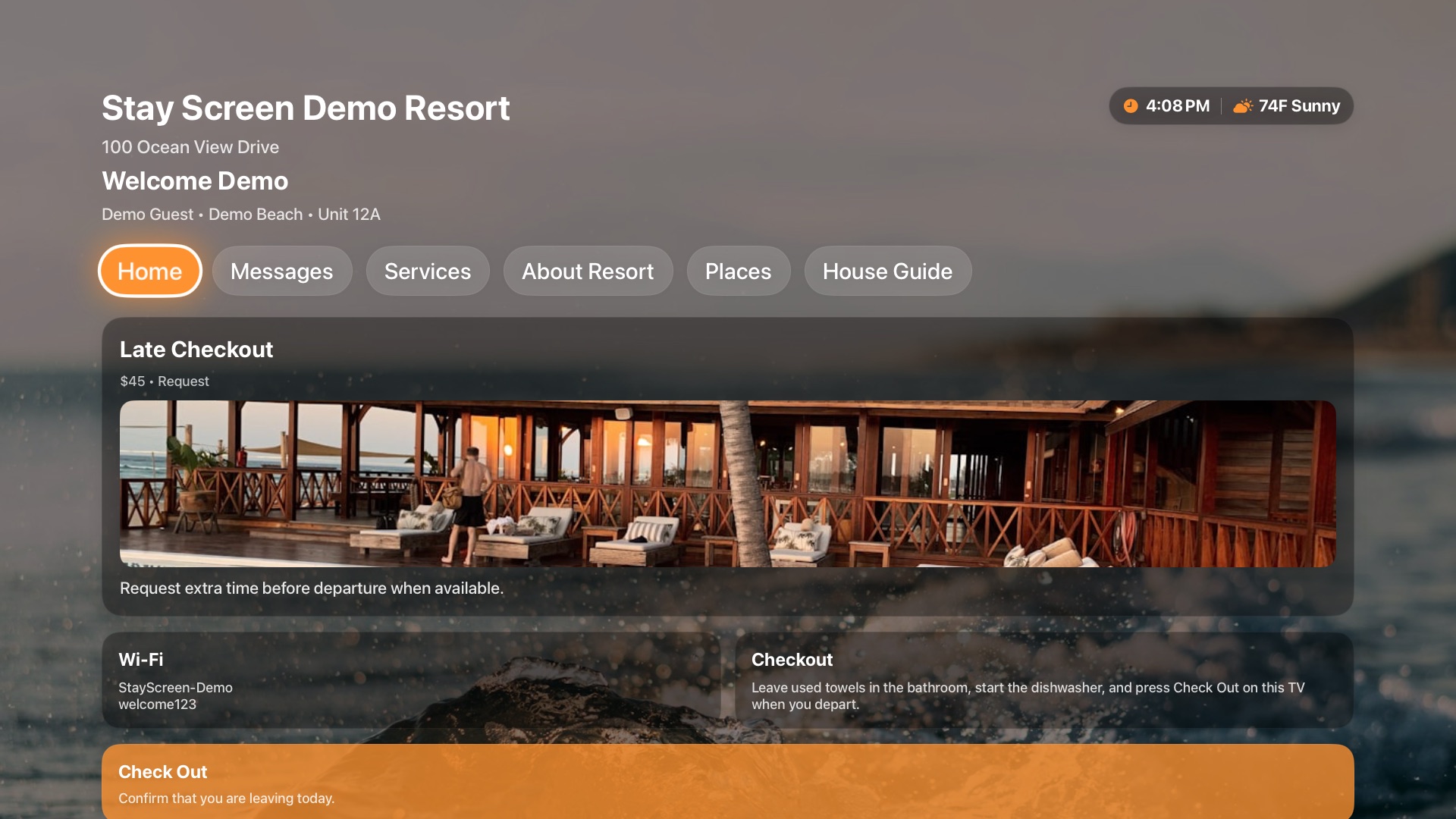
Guest TV guide
Wi-Fi, arrival, house guide, resort info
Revenue tiles
Late checkout, rentals, services, local partners
Checkout flow
One-click checkout from the remote
Checkout alerts
WhatsApp
Notify the owner, co-host, and turnover team as soon as a guest checks out.
Unit 804 checked out
Sent
TV devices
Online
Apple TV · Unit 804Paired
Apple TV · Unit 1206Paired
Team access
Team roles
Give co-hosts, owners, and turnover teams the access they need without sharing one login.
Built for property managers who need consistency across units.
This is not a generic guest app for everyone. Stay Screen is built for operators who manage repeatable guest workflows, owner-approved instructions, turnover coordination, and branded in-room communication.
Keep Wi-Fi, parking, access, checkout, offers, and local recommendations consistent across units.
Replace owner-by-owner notes with approved content that still supports room-specific details.
Reduce preventable questions and get clearer checkout signals from the guest-facing screen.
Question deflection
Track whether Wi-Fi, parking, access, and checkout questions fall after those answers move onto the TV.
Evidence: before/after guest message count.Instruction quality
Check whether owner-approved content stays current across units instead of drifting through PDFs and binders.
Evidence: fewer stale or conflicting instructions.Turnover signal
Measure whether TV checkout creates a cleaner handoff than waiting for texts or scheduled departure time.
Evidence: faster room-ready notification.Decision math for one property.
A property manager does not need another guest-experience category. They need proof that one live unit can reduce preventable messages, protect review moments, and surface paid offers before rollout.
Support ROI
Move the answers guests ask for most onto the TV so staff are not repeatedly handling preventable questions by text, email, or phone.
Revenue ROI
Put late checkout, rentals, amenities, services, and partner offers where the guest sees them during the stay instead of after the buying moment has passed.
Review ROI
Make arrival, stay, and departure instructions obvious enough that guests feel guided instead of confused, especially at high-friction moments.
Short-term rental managers
Boutique hotels
Condo resorts
Resort operators
Turnover partners
Conversion path
Launch the first guest screen, then evaluate support time, add-on visibility, and guest friction.
What Stay Screen replaces.
Your real alternatives are already in the operation: Airbnb messages, PDFs, printed welcome books, QR pages, and tablets. Stay Screen replaces them with a managed TV screen because the TV is visible during the stay.
Airbnb or OTA messages
Replaces buried app threads that guests stop checking once they are inside the unit.
Better because the answer is visible on the in-room TV.Printed books and PDFs
Replace stale instructions that drift by owner, unit, season, or staff handoff.
Better because one dashboard updates every paired screen.QR code pages
Replace scan-and-search flows that make guests use their phone to find basic stay details.
Better because remote-friendly tiles are already on the TV.Tablets and iPads
Replace extra hardware that needs charging, support, replacement, and theft/loss management.
Better because it uses the existing guest-room screen.Stay Screen
Combines property guidance, paid offers, local picks, messages, checkout alerts, and branded presentation.
Replaces scattered instructions with one managed TV welcome system.Show the proof mechanism, not just the promise.
The conversion story is simple: the guest enters the room, sees the TV welcome screen, finds the answer or offer, and the operator gets cleaner downstream signals.
Guest enters to a welcome screen
The TV is already on in the room, welcoming the guest without making them download an app, scan a QR code, or dig through old messages.
Guest opens the right tile
Remote-friendly tiles route them to house guide, offers, local picks, messages, or checkout.
Operator gets the signal
Content updates, offer visibility, and checkout alerts move from scattered tools into a managed workflow.
Primary use case: managed short-term rental portfolios.
Stay Screen is for operators who need the same guest workflow to work across more than one unit.
Guest support
Guests get Wi-Fi, parking, access, checkout, house rules, and local recommendations without texting staff.
Win condition: fewer repeated questions per stay.Portfolio consistency
Managers standardize owner-approved instructions while still keeping room, unit, or property details specific.
Win condition: fewer content mistakes across units.Revenue and checkout
Operators surface late checkout, rentals, services, and local offers while giving teams a checkout signal.
Win condition: more visible add-ons and faster turnover handoff.The property manager problem is scattered guest communication.
Missed add-on revenue
Late checkout, local offers, rentals, spa services, resort amenities, and partner experiences are buried in emails, PDFs, QR codes, or front-desk signage.
Repeated staff interruptions
Staff keep answering the same questions about Wi-Fi, parking, checkout, house rules, amenities, and local recommendations.
Confused guests and weaker reviews
When instructions are scattered or outdated, guests feel unsupported and review the stay through that confusion.
Slow turnover handoffs
Checkout timing is unclear, so turnover teams lose time waiting, texting, or guessing when a unit is empty.
Inconsistent brand experience
Each room, unit, or owner can end up with different instructions, making the stay feel less professional.
Idle in-room screens
The TV sits unused instead of reinforcing your brand, promoting services, and guiding guests through the stay.
Every stay without a clear in-room digital experience creates the same leaks: missed add-on revenue, more guest messages, slower turnovers, and a less polished arrival experience. Across a portfolio, those small misses compound into lower efficiency, weaker reviews, and revenue left on the table.
The first-property launch is deliberately simple.
You do not need a sales cycle or full portfolio migration to learn whether the TV can reduce support work and capture more value from each stay.
- 1. Purchase the first-property plan.Use secure checkout to start at $29/month and receive setup instructions after purchase.
- 2. Turn your current guide into TV content.Add Wi-Fi, house rules, checkout instructions, amenities, offers, local recommendations, and guest messages.
- 3. Pair the TV and score the outcome.Watch whether guests self-serve more answers, see paid offers, and check out with less operator follow-up.
Every stay becomes easier to manage and easier to monetize.
Capture more add-on revenue during the stay.
Put late checkout, local experiences, rentals, resort services, spa offers, food options, and paid upgrades directly on the TV guests already use.
Example: A guest sees a late checkout tile the night before departure and purchases an extra hour.Give guests one obvious place to find what they need.
Wi-Fi, parking, house rules, checkout instructions, amenities, local recommendations, and owner messages are visible on the in-room TV.
Example: A guest arrives late and finds Wi-Fi, parking, and resort access details without texting the host.Reduce repetitive questions and speed up turnover.
Guests self-serve common information, and checkout alerts notify the right people when the unit is empty.
Example: A guest checks out from the TV at 8:47 AM, and the turnover team receives an alert immediately.Make the property feel more professional and memorable.
A branded TV welcome experience feels more polished than a printed binder, generic smart TV home screen, or scattered guest instructions.
Example: A boutique resort shows its brand, property guide, local recommendations, and guest messaging across every unit.What the first property should prove before rollout.
Fewer preventable messages
Compare repeat guest questions before and after launch, especially Wi-Fi, parking, access, house rules, local recommendations, and checkout.
Rollout signal: support volume drops on the first live unit.Cleaner in-room experience
Review whether guests see a polished, current guide instead of owner-by-owner notes, printed binders, PDF links, or QR pages.
Rollout signal: instructions feel consistent and guest-ready.Why trust Stay Screen?
Stay Screen is built around the realities of hospitality operations: guests ignore emails, printed materials go stale, and teams need fast visibility into what is happening inside each unit. Paired TV devices, manager-controlled content, scoped team access, and checkout notifications keep the guest experience current without shared logins or manual updates property by property.
Get the guest TV ROI checklist.
Plan the first property before you start. The checklist helps you decide what belongs on the TV and what result to measure during the first launch.
- List the questions guests ask most
- Spot add-on revenue opportunities
- Choose the first-property success metric
Download the TV apps.
Stay Screen runs on Apple TV guest-room devices for the initial launch. The guest operations workflow is intentionally focused on one supported TV platform while the PMS pilot is validated.
Apple TV
Download on the
App Store
Stay Screen for Apple TV
Install Stay Screen on Apple TV guest-room devices from the App Store.
Buy the first property now. Let the next stays prove whether it earns rollout.
The first purchase should answer a business question, not just unlock software: can the TV reduce guest friction, expose more offers, and speed up your checkout workflow?
What the first property proves
- Whether guests can find key property information without texting staff
- Whether paid offers get a visible in-room placement
- Whether checkout alerts give the team faster turnover visibility
- Whether the branded TV experience feels rollout-ready
What happens after checkout
You receive setup instructions, add the property content you already have, pair the TV, and launch the guest-facing screen for the first unit or property.
Why start small
One live property is enough to measure the conversion path. Expand when the guest experience is clearer and the operator workflow is easier.
See product preview
$29/month for the first property. Start in minutes.
Stop letting the in-room TV sit idle.
Every upcoming stay either keeps creating the same support load, missed offers, and checkout uncertainty, or it becomes the first stay where the TV starts doing the work.
Start with one property for $29/month. No guest app download and no sales call required.